> For the complete documentation index, see [llms.txt](https://help.adalo.com/llms.txt). Markdown versions of documentation pages are available by appending `.md` to page URLs; this page is available as [Markdown](https://help.adalo.com/ja/testing-your-app/publishing-to-the-google-play-store/troubleshooting-android-release/error-existing-users-cant-upgrade-to-new-app-bundles..md).
# エラー:既存のユーザーは新しいアプリバンドルにアップグレードできません。
***
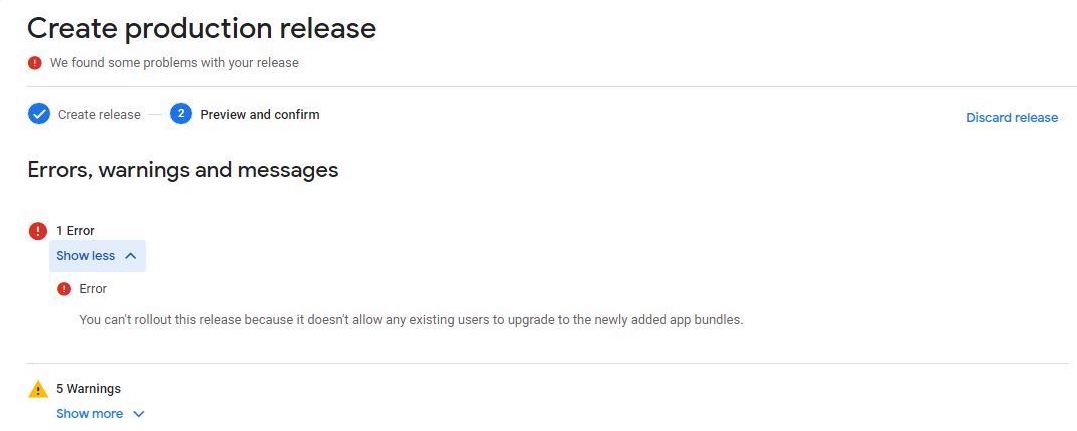
新しいリリースを作成しようとして、次のエラーが表示される場合: ***"You can't rollout this release because it doesn't allow any existing users to upgrade to the newly added app bundles."***
このエラーは、読み込んでいるバージョンコードがテストトラック内の最新リリースよりも古いことを意味します。これは、新しいAdaloアプリから既存のGoogleリストに初めてビルドを読み込む場合に最も一般的ですが、Googleテストトラックを介してリリースを昇格させる際にも発生する可能性があります。
**解決方法:**
1. リリースを破棄します。
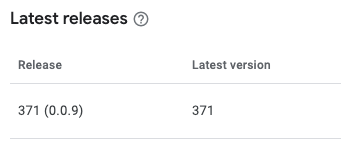
2. 開発者アカウントの ***'Releases Overview'*** で最新のバージョンコードを特定します。
4. 弊社チームによって更新された後、新しいビルドを提出し、Google Playリストに新しいリリースとして読み込みます。
### **まだ助けが必要ですか?**
行き詰まっている場合は心配しないでくださいにお問い合わせいただき、さらなる支援を受けてください。
1. 実施した手順を含める: すでに試したトラブルシューティング手順をお知らせください。
2. スクリーンショットを追加: エラーメッセージと更新しようとしているリストのパッケージ名を示す関連するスクリーンショットを共有してください。
覚えておいてください、私たちはあなたがアプリを正常に動作させ、Google Playストアで輝く準備ができるようお手伝いします!
---
# Agent Instructions
This documentation is published with GitBook. GitBook is the documentation platform designed so that both humans and AI agents can read, navigate, and reason over technical content effectively. Learn more at gitbook.com.
## Querying This Documentation
If you need additional information that is not directly available in this page, you can query the documentation dynamically by asking a question.
Perform an HTTP GET request on the current page URL with the `ask` query parameter, and the optional `goal` query parameter:
```
GET https://help.adalo.com/ja/testing-your-app/publishing-to-the-google-play-store/troubleshooting-android-release/error-existing-users-cant-upgrade-to-new-app-bundles..md?ask=&goal=
```
`ask` is the immediate question: it should be specific, self-contained, and written in natural language.
`goal` is optional and describes the broader end goal you are ultimately trying to accomplish on behalf of the user. GitBook uses it to tailor the answer towards what is most useful for that goal.
The response will contain a direct answer to the question and relevant excerpts and sources from the documentation.
Use this mechanism when the answer is not explicitly present in the current page, you need clarification or additional context, or you want to retrieve related documentation sections.
.png?alt=media)