# Notifications Screen
Whether a notification is sent to all users or a unique user, those users need a way to view the notifications. This can be done through the Notifications Screen. This screen displays all notifications that a user has received. Notifications can be removed from this screen on a per user basis. This screen also contains an Admin Portal button that is shown when a user is also marked as an Admin (Admin? = TRUE) in the database.
With a couple of simple components, the Notifications screen is brought to life.
## The Components
### **List Component**
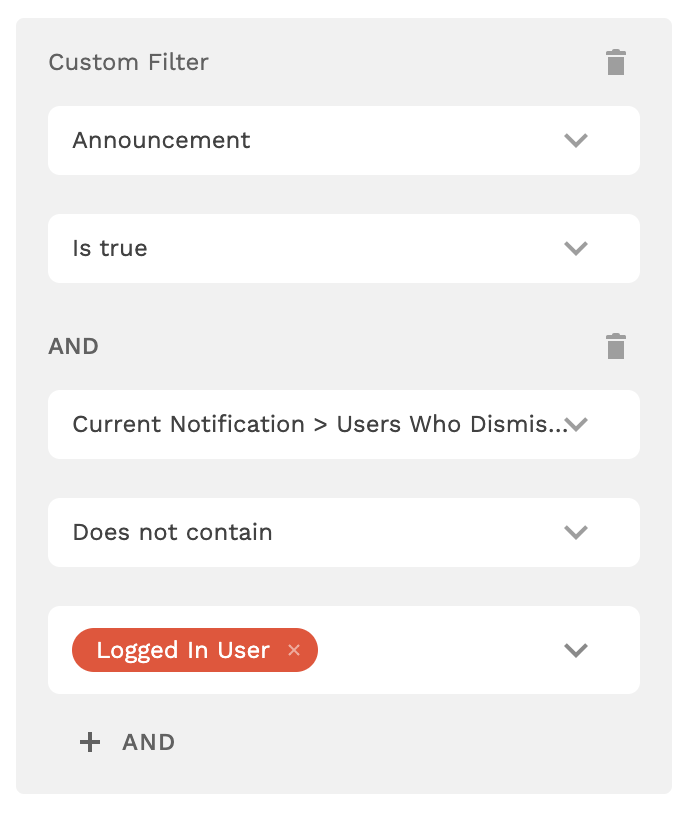
This component displays all the notifications that a user has received. There are a couple of filters on this list shown below:
This filter says the following:
* Display a list of all notifications IF…
* The Users Who Dismissed the current notification does not contain the Logged In User. As in, the current logged in user has not dismissed the notification before.
* AND the current notification is supposed to be shown to the Logged In User based on the User ID.
* OR the notification is marked as an Announcement and it has not been dismissed by the Logged In User.
⚡ **List Action**
* The ‘Cancel’ Icon Updates the Notification and adds the Logged In User to the ‘Users Who Dismissed’ Property.
### Admin Portal Button
The Admin Portal button only displays for users whose Admin? property is marked as TRUE.
⚡ **Button Actions**
* Link Action to ‘Notify All’ Screen